Web HostingMost affordable shared hosting from TZS 9,100 per year
 Dedicated ServersExperience unmatched power and control with a physical server in Tanzania.
 WordPress HostingHigh-Speed, Tanzania-Optimized WordPress Hosting
 Windows HostingOptimized for Windows-based applications and websites
 cPanel HostingUser-friendly hosting powered by cPanel
 Email HostingProfessional Tanzanian email hosting for your .co.tz domain (Secure, reliable, and Swahili-supported)
 Reseller HostingLaunch your own hosting business with minimal technical requirements
 Affiliate ProgramEarn referral commissions by promoting our services
 DomainsFind and register available domain names in seconds
 Domain TransferMove your domain to us with zero downtime and full control
 .co.tzSecure the trusted .co.tz domain made for Tanzanian businesses.
 .tz DomainClaim the official .tz domain for national trust and recognition.
 .com DomainSecure the trusted .com domain for Tanzanian businesses.
 Supported Tlds (glTLDs and ccTLDs)Browse and register domain extensions from around the world
 Whois Lookup | Find Out Who Owns a DomainLook up domain ownership, expiry dates, and registrar information
 VPS
VPS VPS Hosting TanzaniaDedicated resources. Tanzanian performance. Full server control.
 Managed VPS TanzaniaNot a tech expert? Choose a managed Tanzania VPS.
 Website BuilderEasily build beautiful websites with drag-and-drop simplicity.
 Online ShopLaunch a professional e-commerce store without writing code.
 BlogFind latest business, marketing, and tutorials
Your VPS in Tanzania should load pages in under a second. Instead, pages drag. SSH sessions lag. Customers in Dar es Salaam bounce before the content loads.
You already tried the obvious fixes. You restarted the server. You upgraded the plan. Nothing changed.
That happens because most “fix your slow VPS” guides were not written for Tanzania.
They skip the data center location problem. They ignore carrier routing gaps. They also miss the overselling tricks that cheap providers hide behind spec sheets.
This guide gives you a real diagnosis path. You will find the exact cause of your slowness. Then you will fix it with real commands and real numbers from the East African hosting stack.

Reason 1: Your Data Center Is in the Wrong Country
| Server Location | Avg. Latency to Dar es Salaam |
|---|---|
| Johannesburg, South Africa | ~42ms |
| Nairobi, Kenya | ~36ms |
| Dodoma, Tanzania | ~39ms |
| Lisbon, Portugal | ~155ms |
| Frankfurt, Germany | ~165ms |
| New York, USA | ~230ms |
This is the most common and most ignored cause of VPS slowness in Tanzania.
Many Tanzanian businesses buy VPS plans from European or US providers.
The price looks fair. The specs look fine. But the physical distance kills performance.
European data centers typically produce 150 to 180ms latency to Tanzania.
That is three to four times slower than a regional server. From Johannesburg, the measured latency to Arusha sits around 42.7ms. Nairobi comes in at around 36ms.
Your Tanzanian users feel every millisecond of that gap. A round trip from Dar es Salaam to a Frankfurt server and back takes roughly 160ms.
A round trip to Johannesburg takes about 90ms. That difference compounds across every page request, every API call, and every database query on your site.
The Fix: The fix starts with moving your VPS to a data center in Johannesburg, Nairobi, or ideally, Dar es Salaam itself. The latency drop from 160ms to 42ms is immediate, the moment DNS propagates to your new server IP.
Reason 2: Your Host Is Overselling CPU Resources
VPS providers sell more CPU capacity than their physical hardware can actually deliver.
They bet that not all customers will use their full allocation at the same time.
When many customers spike at once, every VPS on that host node slows down.
Linux tracks this problem as CPU steal time. You can check it with the top command.
Look at the %st value in the CPU line. Steal time above 5% for more than 10 minutes means your host is the problem, not your configuration.
Your VPS is waiting for CPU cycles that the host has already promised to someone else.
This shows up as sluggish responses even when your own application is doing nothing intensive.
Run this in your terminal:
topLook for this line in the output:
%Cpu(s): 2.1 us, 0.5 sy, 0.0 ni, 90.1 id, 2.3 wa, 0.0 hi, 0.2 si, 4.8 stThe 4.8 st value is steal time. Anything above 5% consistently means your host is overselling resources.
The Fix: The fix is a provider switch, but do it with evidence first. Run top and record your steal time three times: at noon on a weekday, at 6 PM on a weekday, and at 2 AM.
Screenshot or log all three. If steal time is high across all three windows, the node is constantly oversubscribed. If it spikes only at peak hours, the host is overselling but not catastrophically.
Reason 3: RAM Is Full, and the Server Is Using Swap
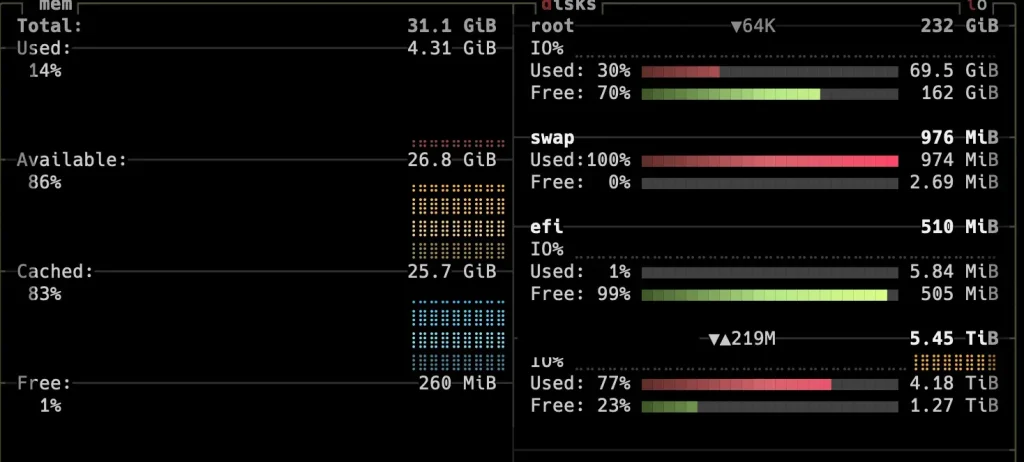
When your VPS runs out of RAM, Linux starts moving memory pages to disk.
This process is called swap. Disk access is many times slower than RAM access. Your server slows down sharply as a result.
Three things eat RAM on most Tanzanian VPS setups:
- MySQL innodb_buffer_pool_size is set higher than the available RAM can support
- Too many PHP-FPM worker processes are running simultaneously
- WordPress plugins that hold memory allocations and never release them
Check your RAM status with:
free -hLook at the “available” column, not the “free” column. The “available” column shows how much RAM Linux can actually give to a new process.
Available RAM below 200MB on a 1GB VPS is a red flag. Swap usage above 50% means performance is already suffering noticeably.
The Fix: Open /etc/mysql/my.cnf and find or add the innodb_buffer_pool_size line. Set it to 50 to 70 percent of your total available RAM.
On a 2GB VPS with 1.6GB usable, that means setting it to around 900MB. Before you set it, check the current value with SHOW VARIABLES LIKE ‘innodb_buffer_pool_size’; in your MySQL console.
Many default installations set it at 128MB, which forces constant disk reads on any database larger than that. Others set it too high, which starves PHP of memory and pushes workers into swap.
Reason 4: Disk I/O Is the Bottleneck, Not the CPU
| Storage Type | Typical Read Speed | Relative Performance |
|---|---|---|
| NVMe SSD | Up to 3,500 MB/s | Fastest |
| SATA SSD | ~550 MB/s | Mid |
| HDD (Spinning) | ~100-150 MB/s | Slowest |
Slow disk activity can make your server feel sluggish even when CPU and RAM metrics look fine.
Every database read, every log write, and every file served depends on how fast your disk responds.
I/O wait above 10% sustained signals slow disk activity or heavy write pressure.
SATA SSD and HDD storage perform far worse than NVMe. Most budget VPS plans in Tanzania still run on SATA SSD at best.
Check your disk type:
lsblk -d -o name,rotaA 0 in the ROTA column means SSD or NVMe. A 1 means a spinning disk (HDD).
Monitor disk I/O in real time:
iostat -x 1 5Watch the %iowait column. Above 10% for a sustained period means the disk is your bottleneck.
The Fix: Reduce how often your application hits the disk at all. Enable OPcache so PHP bytecode stays in memory.
Set MySQL’s query cache so repeat queries skip disk reads entirely.
Install a WordPress page cache plugin so fully rendered HTML pages serve straight from memory.
Reason 5: Your Software Stack Is Misconfigured

A poorly configured server wastes resources and slows down even with good hardware underneath.
Three misconfigurations cause the most problems on Tanzanian VPS setups.
Misconfiguration 1: Apache running where Nginx fits better. Apache spawns a new process for every incoming request. Nginx handles requests with a fixed pool of workers.
For a WordPress site with regular traffic in Tanzania, Nginx uses significantly less RAM.
Misconfiguration 2: MySQL buffer pool set incorrectly. Setting innodb_buffer_pool_size too high eats RAM and pushes other processes into swap.
Setting it too low forces constant disk reads on every query. The right value is 50 to 70% of your total available RAM.
Misconfiguration 3: The PHP-FPM worker count is wrong for your plan. Too many workers eat all your RAM.
Too few leave your CPU idle while users wait in a queue. Use this formula:
pm.max_children = Available RAM in MB / Average PHP process size in MBA typical PHP process uses 20 to 40MB. On a 2GB VPS with 1.5GB available for PHP, you can run 37 to 75 workers safely.
Check your current Apache or Nginx memory footprint:
ps aux | grep -E 'apache|nginx' | awk '{sum += $6} END {print sum/1024 " MB"}'Reason 6: A Security Threat Is Burning Your Resources
Malware and brute-force attacks quietly eat your CPU. They do this without showing up as a clear user-driven load spike.
Many Tanzanian VPS owners never check for this specific problem.
Brute-force SSH attacks create sudden CPU spikes. Servers using the default port 22 with no rate limiting get hit constantly. Check your Fail2Ban status with:
fail2ban-client status sshdIf you see hundreds of banned IPs, attackers are actively probing your server.
Run a malware scan with Linux Malware Detect to find hidden infections:
maldet --scan-all /var/www/Cyber threats in East Africa surged by roughly 40% in the past year. A VPS without active monitoring is an easy target for resource theft.
The Fix: Use htop as your first tool for catching rogue processes. It shows color-coded resource usage in real time. Any process consuming more than 50% CPU consistently deserves immediate investigation.
Frequently Asked Questions
How do I reduce latency on a VPS in East Africa?
Start with Cloudflare’s free CDN tier. Point your DNS to Cloudflare. Your static assets then serve from Cloudflare’s Mombasa or Johannesburg edge nodes. This cuts latency for static content sharply without moving your server.
Why is my VPS slow only for image-heavy pages, not text pages?
Image-heavy pages trigger more HTTP requests, more bandwidth consumption, and more disk reads per page load.
If your server is not compressing images, not caching them with long browser cache headers, and not serving them through a CDN, every visitor downloads the full-size original image directly from your VPS disk on every visit.
Do cron jobs affect VPS speed in Tanzania?
Yes, if they run at the wrong time or are poorly written. A cron job that runs a database backup, image compression task, or large file transfer consumes CPU and disk I/O for its entire duration. If that job runs at 9 AM on a Monday, it competes directly with your peak Tanzanian traffic.
How does a slow VPS in Tanzania affect Google search rankings?
Google uses page speed as a ranking signal through Core Web Vitals. Three metrics matter most: Largest Contentful Paint (LCP), Interaction to Next Paint (INP), and Cumulative Layout Shift (CLS). A slow VPS directly damages LCP and INP scores for Tanzanian visitors.
Get the Best VPS Performance
Your VPS should provide fast and reliable performance even during peak traffic hours.
If you have fixed all the issues covered in this guide and you are still experiencing latency issues, it’s finally time to upgrade your hosting package.