Web HostingMost affordable shared hosting from TZS 9,100 per year
 Dedicated ServersExperience unmatched power and control with a physical server in Tanzania.
 WordPress HostingHigh-Speed, Tanzania-Optimized WordPress Hosting
 Windows HostingOptimized for Windows-based applications and websites
 cPanel HostingUser-friendly hosting powered by cPanel
 Email HostingProfessional Tanzanian email hosting for your .co.tz domain (Secure, reliable, and Swahili-supported)
 Reseller HostingLaunch your own hosting business with minimal technical requirements
 Affiliate ProgramEarn referral commissions by promoting our services
 DomainsFind and register available domain names in seconds
 Domain TransferMove your domain to us with zero downtime and full control
 .co.tzSecure the trusted .co.tz domain made for Tanzanian businesses.
 .tz DomainClaim the official .tz domain for national trust and recognition.
 .com DomainSecure the trusted .com domain for Tanzanian businesses.
 Supported Tlds (glTLDs and ccTLDs)Browse and register domain extensions from around the world
 Whois Lookup | Find Out Who Owns a DomainLook up domain ownership, expiry dates, and registrar information
 VPS
VPS VPS Hosting TanzaniaDedicated resources. Tanzanian performance. Full server control.
 Managed VPS TanzaniaNot a tech expert? Choose a managed Tanzania VPS.
 Website BuilderEasily build beautiful websites with drag-and-drop simplicity.
 Online ShopLaunch a professional e-commerce store without writing code.
 BlogFind latest business, marketing, and tutorials
A one-minute outage during a product launch costs more than a full year of VPS hosting. Most Tanzanian WordPress site owners only discover their server’s limits when a campaign goes live, and the site goes dark.
This guide walks you through a seven-step scaling plan built for Tanzania. You will learn caching, CDNs with African edge nodes, VPS upgrades in TZS, and load-testing tools. After this, your site stays live as traffic continues to come in.
Pre-traffic-surge checklist
| Action | Tool | Time Required | Cost (TZS) |
|---|---|---|---|
| Install and configure a caching plugin | WP Rocket or W3 Total Cache | 30 min | Free – 50,000 TZS/yr |
| Set up Cloudflare CDN | Cloudflare.com | 20 – 30 min | Free |
| Convert images to WebP format | ShortPixel or Imagify | 1 – 2 hrs | Free – 15,000 TZS/mo |
| Update PHP to version 8.1 or higher | cPanel > PHP Version Manager | 5 min | Free |
| Disable all unused plugins | WordPress Dashboard > Plugins | 10 min | Free |
| Enable GZIP compression | Check the wp_options autoload size | 10 min | Free |
| Set up uptime monitoring | UptimeRobot (free tier) | 5 min | Free |
| Run a load test | Loader.io or k6 | 30 – 45 min | Free |
| UpdraftPlus or a host backup tool | phpMyAdmin SQL query | 15 min | Free |
| Confirm backup schedule is active | UpdraftPlus or host backup tool | 5 min | Free – 25,000 TZS/yr |
Step 1: Test Your WordPress Site Before You Scale
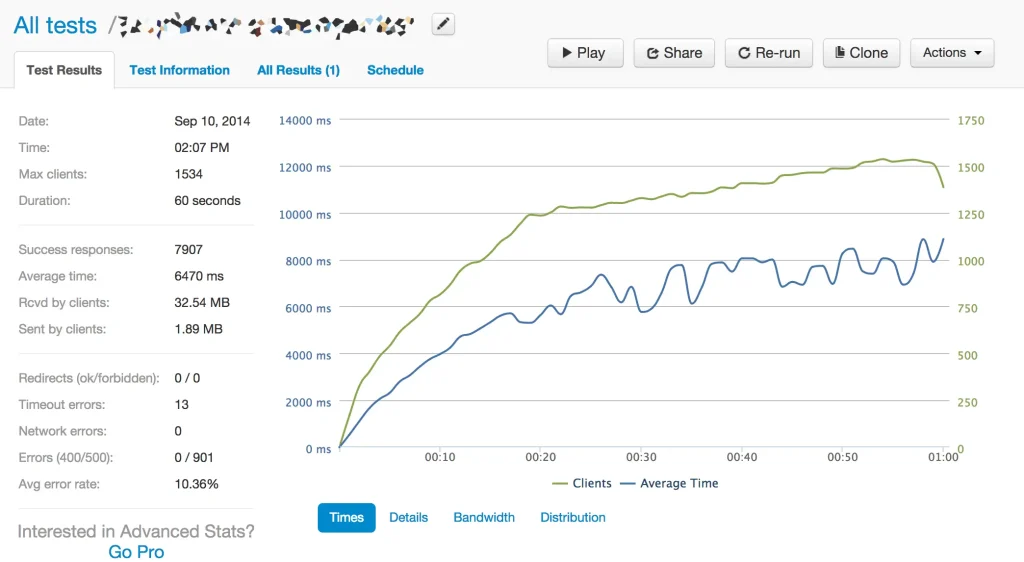
Get real data before you spend money on upgrades. Loader.io offers a free tier that simulates concurrent users hitting your site.
Start with a 50-concurrent-user test to establish a baseline. Then run tests at 100 and 200 concurrent users.
Watch for TTFB above 350ms and any timeouts in the results. Tools like k6 go a step further. k6 helps identify bottlenecks, such as slow database queries or plugin conflicts, before real users arrive.
A k6 test script runs from the command line and breaks down which endpoints are slow under load. Run these tests during off-peak hours to minimize impact on real visitors.
Step 2: Set Up Caching to Cut Server Load by 80%
With page caching active, your server builds a page once and stores a static copy.
Every subsequent visitor gets that stored copy directly, without touching the database. This reduces PHP execution and MySQL query counts from 30+ to 0 per cached page.
WP Rocket handles this well for paid setups. W3 Total Cache is free and works well. Activate page caching first before anything else.
Object Caching With Redis

Page caching covers anonymous visitors. But logged-in users bypass the page cache. WooCommerce shoppers, members, and news subscribers all fall into this category.
Redis stores database query results in memory, so repeated queries return instantly.
Storing frequently accessed objects in Redis memory eliminates disk I/O bottlenecks during traffic peaks.
WooCommerce stores, membership sites, and news sites with login systems benefit most from Redis.
To verify Redis is active on your server, run this WP-CLI command:
wp redis statusIf it returns “Status: Connected,” Redis is working correctly.
Browser Caching and GZIP Compression
Browser caching tells a visitor’s browser to store static files locally after the first visit. On return visits, the browser loads those files from disk instead of fetching them again.
Add cache-control headers to your .htaccess file to set static assets to expire after 30 days.
GZIP compression shrinks your HTML, CSS, and JavaScript files before they travel over the network.
Add the GZIP directives to your .htaccess file on Apache servers. Together, these two changes alone can improve your PageSpeed score by 15 to 25 points.
Step 3: Use a CDN With African Edge Nodes
| CDN | African PoPs | Pricing | Free Tier |
|---|---|---|---|
| Cloudflare | Nairobi, Johannesburg, Lagos | No – billed from the first GB | Yes – 100K requests per day |
| BunnyCDN | Johannesburg | Pay per GB served | No – billed from first GB |
| AWS CloudFront | Cape Town | Pay per GB served | Limited free tier |
A CDN without African edge nodes still routes your traffic through European or US servers.
A round-trip from Dar es Salaam to a London server adds roughly 150ms of latency per asset. That delay stacks up across 30 or more assets on a typical page.
Extra latency shows up directly in your LCP scores. Only CDNs with Points of Presence in Africa can serve Tanzanian users from nearby nodes. Three CDN options cover East Africa well: BunnyCDN, Cloudflare, and AWS CloudFront.
Step 4: Optimize Your WordPress Database
Every standard WordPress page load runs 10-50 MySQL queries.
A WooCommerce product page can run 80 or more. As your site grows, so does your database.
Post revisions, expired transients, spam records, and autoloaded plugin data bloat the wp_options table.
Reducing database load directly cuts server overhead during high-traffic periods.
A bloated database slows every page load, even with caching active. The fix starts with knowing what takes up space.
Clean and Optimize Tables
The WP-Optimize plugin handles database cleanup well. Install it and schedule weekly automatic cleanups.
These cleanups automatically remove post revisions, trash, spam, and expired transients.
To check your current table sizes, run this MySQL command from phpMyAdmin:
SELECT table_name, ROUND(data_length/1024/1024, 2) AS size_mb
FROM information_schema.tables
WHERE table_schema = 'your_db_name'
ORDER BY size_mb DESC;
Limit Post Revisions and Autoloaded Data
WordPress saves a new revision every time you update a post. On a busy news site, this produces hundreds of revision rows per article. Add this line to your wp-config.php file to cap revisions at five:
define('WP_POST_REVISIONS', 5);Autoloaded data also deserves attention. Anything above 1MB in the autoload column of wp_options slows every page load. Run this SQL query to find the biggest offenders:
SELECT option_name, length(option_value) AS autoload_size
FROM wp_options WHERE autoload='yes'
ORDER BY autoload_size DESC LIMIT 20;
Review the results and remove or disable plugin data that no longer belongs there.
Step 5: Choose the Right Hosting for High Traffic
Vertical scaling works well for most WordPress sites. Adding more RAM or CPU to your existing server effectively handles most traffic growth.
- Shared hosting is suitable for sites with fewer than 10,000 monthly visits.
- Between 10,000 and 100,000 monthly visits, a VPS gives you dedicated resources.
- Above 100,000 monthly visits, cloud or managed hosting handles the load more reliably.
Truehost Tanzania’s VPS plans offer clear TZS pricing with defined RAM and CPU allocations. A 2GB RAM VPS from Truehost can handle five to ten times as many concurrent users as a standard shared plan.
Step 6: Scale Your Images and Media
WebP images are 25-34% smaller than JPEGs at the same visual quality. For a Tanzanian audience averaging 12.5 Mbps on mobile, that size difference matters.
ShortPixel and Imagify both handle bulk WebP conversion of your existing media library.
Either plugin converts uploaded images to WebP and serves the correct format to each browser. A 200KB JPEG becomes roughly 130KB after conversion to WebP.
Across a 500-image site, that adds up to tens of megabytes of savings per session.
Lazy Loading and Responsive Images
WordPress 5.5 and later enables lazy loading by default. To confirm it works, open Chrome DevTools and inspect any image below the fold. Look for the loading=”lazy” attribute in the element panel. If it appears, lazy loading is active on your site.
Lazy loading tells the browser to skip off-screen images until the user scrolls near them. This significantly reduces initial page weight and speeds up your first render.
However, images above the fold should never have the lazy-loading attribute. Above-the-fold images form your Largest Contentful Paint element. Lazy loading them delays your LCP score and hurts your Google rankings.
Step 7: Handle Traffic Spikes With Auto-Scaling
Auto-scaling watches traffic in real time and adjusts server capacity without manual input.
A post goes viral on X, radio mentions your site, or a campaign launches. Traffic spikes within minutes, and your server needs to absorb it immediately.
Most cloud providers offer auto-scaling RAM and CPU allocation for VPS hosting to handle increased traffic. These then downscale again after the spike passes to control your monthly costs.
Use Cloudflare Page Rules to Protect During Spikes
Cloudflare’s Under Attack Mode adds a JavaScript challenge before serving any page. This screen filters out most bots and scraping tools during traffic surges.
Legitimate human visitors pass through the challenge in three to five seconds.
Set up a rate-limiting rule in the Security tab to block IPs making over 100 requests per minute. This stops aggressive crawlers and DDoS attempts from consuming your server resources.
Cloudflare Workers gives you the next level of traffic control. With Workers, you handle redirects, header rewrites, and A/B test routing at the edge. None of that logic touches your origin server at all.
Frequently Asked Questions
How Many Visitors Can a Shared Host in Tanzania Handle?
Most shared hosts in Tanzania handle 50 to 150 concurrent users before slowing down. A cached static page survives more traffic than a WooCommerce checkout page. If your site runs WooCommerce or membership logins, expect that ceiling to drop. On shared hosting, 30 to 80 concurrent users is a more realistic limit for dynamic sites.
What Is the Best CDN for East African Websites?
Cloudflare’s free tier works well for most Tanzanian sites starting out. BunnyCDN suits sites that need pay-as-you-go billing with African edge node coverage.
Does WordPress Slow Down With More Traffic?
Yes, and the reason is simple. Without caching, every visitor triggers fresh PHP execution and new database queries. With full-page caching active, WordPress serves thousands of users from static files. The server only gets involved when a page is not cached or when a logged-in user requests a dynamic page.
Is VPS Better Than Shared Hosting for High-Traffic Sites in Tanzania?
Yes, for sites with more than 10,000 monthly visits. Shared hosting pools RAM and CPU across many accounts on the same server. One neighbouring account consuming excess resources can slow your site without warning. A 2GB RAM VPS from Truehost Tanzania can handle five to ten times as many concurrent users as a standard shared plan.
Keep Scaling as Your Traffic Grows
Scaling your WordPress site is not a one-time project. It works best as a monthly audit habit. Check your Core Web Vitals in Google Search Console every four weeks.
Review your caching hit rate in Cloudflare Analytics each month. Run a load test after any major site update or before a planned campaign.
Each small improvement compounds month after month. A faster site earns better rankings, lower bounce rates, and more conversions from the same traffic.
While at it, check if your current hosting plan can handle your next traffic spike.
Compare Truehost Tanzania’s managed WordPress hosting plans to find the right fit for your site’s growth stage.