Web HostingMost affordable shared hosting from TZS 9,100 per year
 Dedicated ServersExperience unmatched power and control with a physical server in Tanzania.
 WordPress HostingHigh-Speed, Tanzania-Optimized WordPress Hosting
 Windows HostingOptimized for Windows-based applications and websites
 cPanel HostingUser-friendly hosting powered by cPanel
 Email HostingProfessional Tanzanian email hosting for your .co.tz domain (Secure, reliable, and Swahili-supported)
 Reseller HostingLaunch your own hosting business with minimal technical requirements
 Affiliate ProgramEarn referral commissions by promoting our services
 DomainsFind and register available domain names in seconds
 Domain TransferMove your domain to us with zero downtime and full control
 .co.tzSecure the trusted .co.tz domain made for Tanzanian businesses.
 .tz DomainClaim the official .tz domain for national trust and recognition.
 .com DomainSecure the trusted .com domain for Tanzanian businesses.
 Supported Tlds (glTLDs and ccTLDs)Browse and register domain extensions from around the world
 Whois Lookup | Find Out Who Owns a DomainLook up domain ownership, expiry dates, and registrar information
 VPS
VPS VPS Hosting TanzaniaDedicated resources. Tanzanian performance. Full server control.
 Managed VPS TanzaniaNot a tech expert? Choose a managed Tanzania VPS.
 Website BuilderEasily build beautiful websites with drag-and-drop simplicity.
 Online ShopLaunch a professional e-commerce store without writing code.
 BlogFind latest business, marketing, and tutorials
You just set up your Truehost VPS in Tanzania. You have root access and a blank Linux machine. Before you install anything, you face one question: Apache or NGINX?
Get this wrong, and your site will crawl under a traffic spike. Your server may run out of RAM before MySQL even starts.
The guides online are not much help, either. They test 16-core machines with 32GB of RAM. Your VPS has 2GB. Your visitors are on Vodacom or Airtel LTE in Dar es Salaam and Mwanza.
This guide cuts through the noise. It maps Apache and NGINX directly to the conditions Tanzanian VPS users face every day. By the end, you will know which server fits your site and exactly why.
What Apache and NGINX Actually Do on Your VPS
| Feature | Apache | NGINX |
|---|---|---|
| Architecture | Process-driven (thread per connection) | Event-driven (async, non-blocking) |
| Config Style | Per-directory via .htaccess files | Centralized config file only |
| Static Content | Good | Excellent (up to 2-4x quicker under load) |
| PHP Handling | mod_php or PHP-FPM | PHP-FPM only |
| .htaccess Support | Yes | No |
| Memory on 2GB VPS | 200 to 400MB | 30 to 50MB |
| Best For | Legacy sites, cPanel migrations | New deployments, high-traffic sites |
Both Apache and NGINX are open-source web server programs. They receive HTTP requests from browsers and send back the web pages your visitors see. That is where the similarity ends.
Apache has been the dominant web server since 1995. It uses a process-driven model where each incoming request gets its own thread or process. This makes it flexible and easy to configure.
NGINX was built in 2004 to solve a specific problem: handling 10,000 concurrent connections on one machine. It uses an event-driven model that handles all connections through a small, fixed pool of worker processes.
Both servers can run your website. The performance difference becomes apparent under heavy traffic. It also shows up when your RAM budget is tight, which is the case with most entry-level Tanzanian VPS plans.
1) How Each Server Handles Connections
The biggest difference between Apache and NGINX lies in their connection models. Knowing this helps you predict how each server will behave on your Tanzania VPS during a traffic spike.
Apache’s Thread-Per-Connection Model
Apache handles connections through what it calls Multi-Processing Modules, or MPMs. The oldest MPM is called prefork. With prefork, Apache spawns a new process for every incoming request.
Each process holds the PHP interpreter in memory. This works fine for small sites with low traffic.
The modern default MPM is called mpm_event. It is lighter than prefork. Even so, it still ties a thread to each active connection.
As traffic spikes, Apache spawns more threads. More threads consume more memory. On a server with 2GB of RAM, this can get expensive quickly.
On a 2GB VPS, Apache’s web server processes alone can consume between 200 and 400MB of RAM. This leaves less room for MySQL and PHP-FPM, which is where your site’s real work happens.
NGINX’s Event-Driven Model
NGINX uses one master process and a small number of worker processes. Each worker handles thousands of connections simultaneously through a non-blocking event loop.
No new process gets spawned for each request. The worker receives the request, starts processing it, and moves on to the next connection while waiting for disk or network I/O. As a result, NGINX’s memory use stays nearly flat even as traffic climbs.
On a 2GB VPS, NGINX typically consumes only 30 to 50MB for its own processes. That leaves significantly more RAM for MySQL and PHP-FPM.
On an entry-level Truehost VPS plan, this gap is the difference between a site that runs smoothly and one that crashes under a traffic spike.
2) Performance Numbers That Matter for Tanzania VPS Users

Most Apache vs NGINX performance comparisons use servers with 16 cores and 32GB of RAM. That data is not very useful when you are running a 2GB VPS in East Africa.
Here are the numbers at the scale that actually matters for Tanzanian site owners.
Static Content: Images, CSS, JavaScript, and HTML
For static files, NGINX has a clear advantage. Its event-driven model does not invoke PHP for static requests.
Each image or CSS file request is lightweight and cheap. Apache, even with mpm_event, carries more overhead per request.
Load tests at 500 concurrent connections show NGINX handling static content with roughly 53% higher throughput than Apache. NGINX also runs with a memory footprint less than half that of the same workload.
For a WooCommerce store running a flash sale in Dar es Salaam, that difference is the gap between a smooth experience and a crashed server.
NGINX uses 5-6% less system memory than Apache at 512 concurrent connections. That gap grows as concurrency doubles. On a constrained VPS, every megabyte of RAM counts.
Dynamic Content: PHP, WordPress, and WooCommerce
The performance gap narrows for PHP-heavy pages. Both servers send PHP requests to PHP-FPM, a separate process manager that handles PHP execution.
When PHP-FPM becomes the bottleneck, the choice of web server matters less for raw speed.
In tests using Laravel 11 via PHP-FPM on a clean VPS, NGINX and Apache performed within 10-15% of each other in terms of request throughput.
The speed difference for PHP pages is smaller than most guides suggest.
The reason to choose NGINX for WordPress in Tanzania is memory, not raw speed. NGINX leaves more RAM for PHP-FPM and MySQL.
More available RAM for MySQL means quicker queries. Quicker queries translate directly into quicker page loads for your visitors in Arusha or Mwanza.
3) Configuration: Which Server Is Easier to Manage on Your Tanzania VPS?
Performance data alone does not tell the full story. Configuration experience matters too, especially for site owners who are not full-time sysadmins.
Apache’s .htaccess Advantage
Apache supports a feature called .htaccess. This is a plain text file you place in any directory on your server.
It lets you change redirects, rewrite rules, and access controls without editing the main server configuration. You do not need to restart Apache for changes to take effect.
For Tanzanian site owners migrating from shared cPanel hosting, .htaccess is familiar territory. WordPress generates .htaccess rules automatically for permalink structures.
Many Tanzanian business sites also carry custom redirect chains in .htaccess files built up over years of operation.
NGINX’s Centralized Configuration
NGINX stores all configuration in files under /etc/nginx/. There are no .htaccess overrides. Every rule you want to apply must go directly into the main config file.
For a developer managing their own Truehost VPS, the NGINX config is cleaner and easier to reason about. For a non-technical site owner who used cPanel for years, Apache’s .htaccess system will feel more natural. The right choice depends on who will actually manage the server day to day.
4) WordPress on a Tanzania VPS: Apache or NGINX?

Most Truehost VPS users in Tanzania run WordPress. Here is a direct answer on what works best in production.
NGINX + PHP-FPM Stack
NGINX with PHP-FPM is the preferred production stack for WordPress in 2026. PHP-FPM manages PHP workers as a separate service.
NGINX handles everything else: static files, SSL termination, caching headers, and routing PHP requests to FPM.
This separation keeps the web server lean. A PNG image request never touches PHP. A CSS file request never touches PHP either.
Only requests for .php files or WordPress dynamic routes pass through to PHP-FPM. The result is a server that remains responsive under heavy traffic without ballooning memory usage.
Apache with mod_php vs Apache with PHP-FPM
If you choose Apache, how you configure PHP matters a great deal. The wrong configuration wastes RAM on every single request.
Apache with mod_php embeds the PHP interpreter directly inside each Apache process. Every request Apache handles, even one for a CSS file, carries the PHP interpreter in memory. On a 2GB VPS, this gets expensive quickly.
Apache with PHP-FPM separates the PHP interpreter from Apache, just as NGINX does. Apache handles the HTTP layer and forwards PHP requests to PHP-FPM. Memory use drops significantly compared to mod_php. The site runs quicker and more reliably under load.
Running Apache without PHP-FPM means you leave significant RAM on the table. On any Truehost Tanzania VPS plan with limited memory, that is a setup worth fixing before you launch.
The Hybrid Setup: Run NGINX in Front of Apache
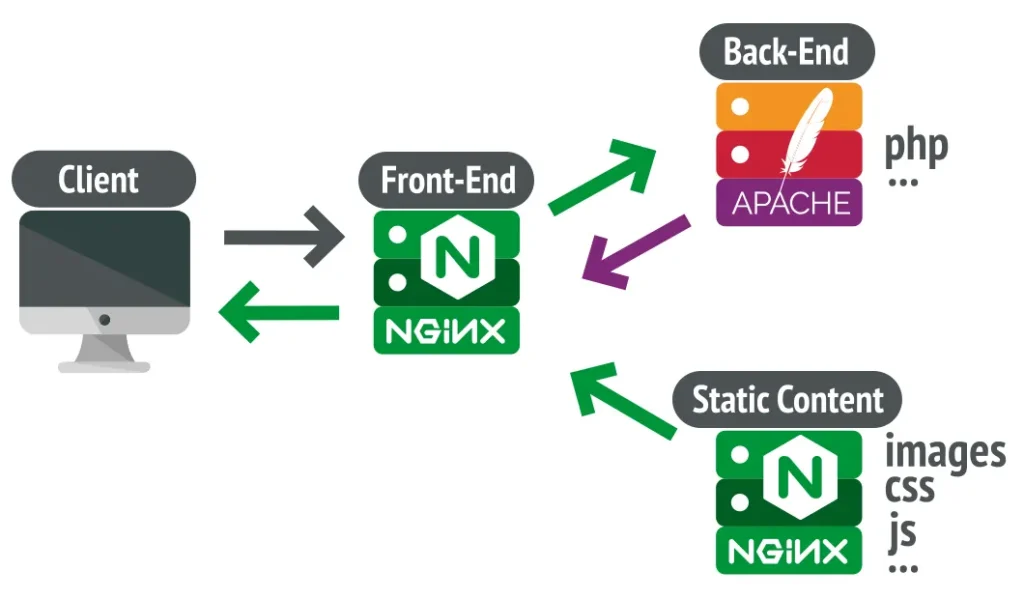
Some production sites in Tanzania use both servers together. NGINX acts as a reverse proxy on ports 80 and 443.
Apache runs on port 8080. This setup gives you the strengths of both servers at the same time.
In this setup, NGINX handles all incoming traffic first. Static files such as images, CSS, and JavaScript are served directly by NGINX. PHP requests pass through to Apache on port 8080. Apache processes them and sends the response back to the browser via NGINX.
This hybrid approach gives you NGINX’s speed for static assets and Apache’s .htaccess flexibility for application logic.
For a Tanzanian site migrating from shared hosting with complex .htaccess rules, this is a practical transition path.
You keep your existing Apache rules working while NGINX handles the static file load efficiently.
Which Web Server Should You Choose? A Decision Framework
You now have enough information to make a clear call. Here is a direct decision framework tailored to your situation.
Choose NGINX If:
- Your VPS has 1 to 4GB of RAM
- You run a WooCommerce store, SaaS app, or high-traffic blog
- You manage the server yourself via SSH
- You serve images, downloads, or heavy static content
- You are building a new site with no existing .htaccess dependencies
Choose Apache If:
- You are migrating from cPanel shared hosting with existing .htaccess rules
- Your team is more familiar with Apache configuration and documentation
- You use modules like mod_security or mod_rewrite, and need them to be active
- Your site gets low to moderate traffic, and raw performance is not the top concern
Choose the Hybrid Setup If:
- You need .htaccess compatibility, but also want NGINX-level static content performance
- You are an intermediate or advanced sysadmin comfortable managing both servers
- You run a legacy PHP application that you cannot fully migrate yet
Frequently Asked Questions
Which web server uses less RAM on a VPS, Apache or NGINX?
NGINX uses significantly less RAM. On a 2GB VPS, NGINX typically uses 30 to 50MB for its own processes. Apache uses between 200 and 400MB under the same load. That gap leaves far more memory available for MySQL and PHP-FPM on the same machine.
Can I run WordPress on NGINX on a Tanzania VPS?
Yes, and it works very well. You need NGINX and PHP-FPM installed on your server. The main adjustment is that WordPress permalink rules must be added directly to your NGINX server block. NGINX does not read .htaccess files. The try_files directive covers the entire WordPress .htaccess permalink block.
What is the difference between Apache and NGINX architecture?
Apache assigns a process or thread to every incoming connection. More connections mean more processes and higher memory use.
NGINX uses a non-blocking event loop, with a small set of worker processes handling thousands of connections at once. Memory stays stable even as traffic spikes sharply.
Is NGINX better than Apache for high-traffic websites in Tanzania?
For most high-traffic scenarios in Tanzania, yes. Mobile-heavy traffic from Vodacom, Airtel, and Tigo users creates many concurrent connections.
NGINX handles these without growing memory usage. Apache spawns new threads under load, which drains RAM quickly on an entry-level VPS.
Can I use both Apache and NGINX on the same VPS server?
Yes. The standard setup runs NGINX as a reverse proxy on ports 80 and 443, with Apache handling PHP on port 8080.
NGINX serves static files directly and passes dynamic requests to Apache. This setup works well for legacy site migrations but adds configuration complexity.
Ready to Launch Your VPS in Tanzania?
Truehost Tanzania VPS plans give you full root access to configure the server exactly as described in this guide. Servers run on East African infrastructure.
Your visitors in Dar es Salaam, Mwanza, and Arusha get the low-latency performance they need.
Prefer a managed setup? The managed VPS option handles web server configuration, PHP-FPM setup, security hardening, and daily backups. Your team focuses on the site. Truehost handles the stack.