Web HostingMost affordable shared hosting from TZS 9,100 per year
 Dedicated ServersExperience unmatched power and control with a physical server in Tanzania.
 WordPress HostingHigh-Speed, Tanzania-Optimized WordPress Hosting
 Windows HostingOptimized for Windows-based applications and websites
 cPanel HostingUser-friendly hosting powered by cPanel
 Email HostingProfessional Tanzanian email hosting for your .co.tz domain (Secure, reliable, and Swahili-supported)
 Reseller HostingLaunch your own hosting business with minimal technical requirements
 Affiliate ProgramEarn referral commissions by promoting our services
 DomainsFind and register available domain names in seconds
 Domain TransferMove your domain to us with zero downtime and full control
 .co.tzSecure the trusted .co.tz domain made for Tanzanian businesses.
 .tz DomainClaim the official .tz domain for national trust and recognition.
 .com DomainSecure the trusted .com domain for Tanzanian businesses.
 Supported Tlds (glTLDs and ccTLDs)Browse and register domain extensions from around the world
 Whois Lookup | Find Out Who Owns a DomainLook up domain ownership, expiry dates, and registrar information
 VPS
VPS VPS Hosting TanzaniaDedicated resources. Tanzanian performance. Full server control.
 Managed VPS TanzaniaNot a tech expert? Choose a managed Tanzania VPS.
 Website BuilderEasily build beautiful websites with drag-and-drop simplicity.
 Online ShopLaunch a professional e-commerce store without writing code.
 BlogFind latest business, marketing, and tutorials
Your app goes viral overnight. Traffic multiplies by 10x. Your website’s server crashes at 2 am.
You wake up to angry users and a dead product. Kubernetes would have handled the whole thing while you slept.
The thing is, you have heard the word Kubernetes orchestration in tech groups, job listings, and LinkedIn posts.
The explanations you find are written for engineers at Google or Amazon.
They assume you already know terms like cluster autoscaling and control plane. That gap is frustrating, and it is completely valid.
Kubernetes orchestration is the automated management of containerized applications across multiple machines.
This article explains Kubernetes orchestration in plain, honest language. Let’s connect that knowledge directly to the Tanzanian tech market.
The Problem Kubernetes Was Built to Solve
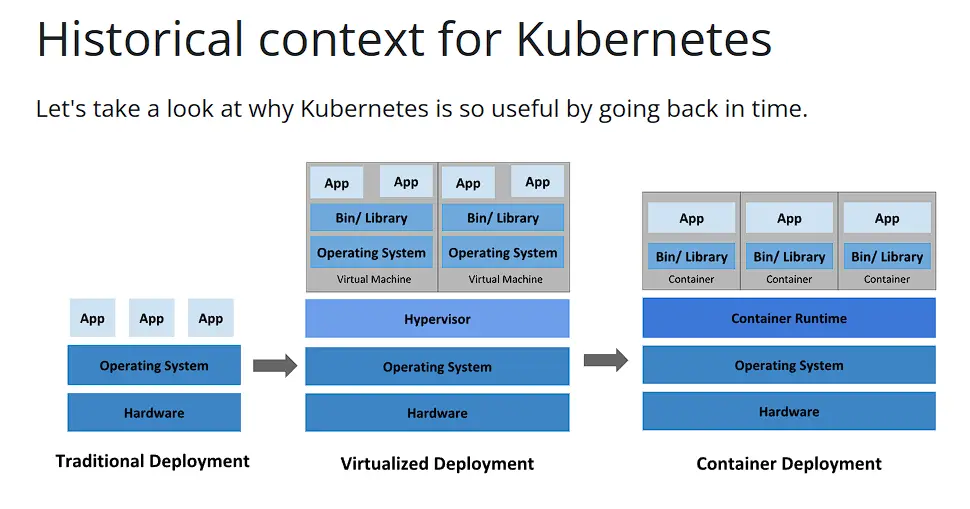
Kubernetes is an open-source platform that automates container deployment, scaling, and management.
Modern apps are often not single programs running on one server. They are collections of smaller services, each running inside a container.
One service handles user authentication. Another manages payments. Another sends emails.
Each container needs to run somewhere, stay alive, and talk to the others. Managing all of that manually is a real problem, hence the need for Kubernetes.
When a container crashes, Kubernetes restarts it automatically. When traffic spikes, it spins up more containers to handle the load.
When traffic drops, it scales back down and saves on cloud costs. You describe the state you want. Kubernetes keeps everything matching that description.
K8s is just a shorthand for Kubernetes. It refers to the 8 letters sitting between the K and the s. You will see K8s everywhere in job listings and documentation.
The Core Building Blocks
You do not need to memorize every Kubernetes concept on day one. Start with these five, and the rest will follow on its own.
| Concept | What It Does | Market Analogy |
| Pod | Smallest deployable unit. Wraps one or more containers. | One vendor stall at the market |
| Node | Physical or virtual machine. Runs your Pods. | The market floor |
| Cluster | Full collection of Nodes working together. | The entire market |
| Service | Stable network endpoint for a group of Pods. | The market address customers use |
| Deployment | Manages rollouts and scaling. Keeps replicas alive. | The market manager sets stall rules |
How the Kubernetes Control Plane Makes Decisions
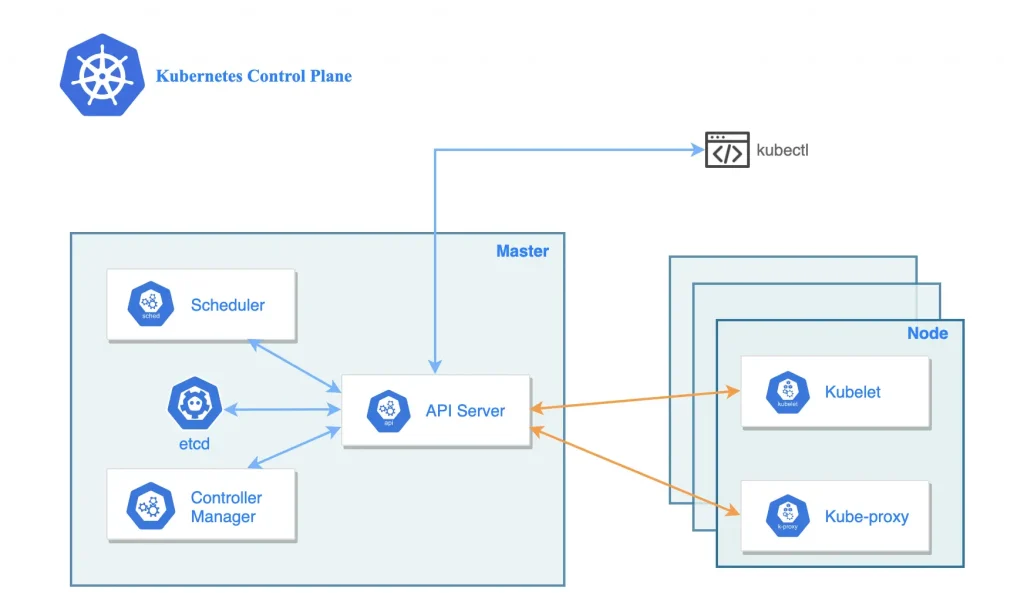
The Control Plane is the brain of a Kubernetes Cluster. It watches your system constantly, comparing what you want to what is actually running.
When those two things do not match, it fixes the difference automatically.
Three components handle most of the work here.
The API Server is the front door. Every instruction passes through it first.
The Scheduler decides which Node gets each new Pod, based on available resources.
etcd is the cluster memory. It stores the current state of everything.
What Kubernetes Actually Does: The 5 Core Capabilities
I) Automated Scaling
Traffic to your app is never flat. It spikes, dips, and it spikes again.
Kubernetes uses a feature called the Horizontal Pod Autoscaler, or HPA, to respond in real time.
When traffic increases, HPA spins up more Pod replicas automatically.
When traffic drops, it scales those replicas back down and saves on cloud costs.
II) Self-Healing Infrastructure
When a container crashes, Kubernetes restarts it without waiting for a human to notice.
When a Node fails, Kubernetes moves its workloads to a healthy Node automatically. The process from failure to recovery takes seconds, not minutes.
III) Rolling Updates and Zero-Downtime Deployments
Old-school deployments work like this: shut the app down, push the new version, restart.
During that window, users see an error page. In fintech, that costs trust directly.
Kubernetes handles updates differently. It replaces containers one at a time, keeping the server live throughout the full process.
If the new version has a bug, Kubernetes rolls it back automatically.
Some teams go further with canary deployments, testing a new version with just 5% of traffic first. Once it proves stable, they roll it out to everyone.
IV) Resource Efficiency and Cost Control
Kubernetes places workloads on Nodes based on available CPU and memory.
This process is called bin-packing, and it reduces wasted compute resources significantly.
A Node sitting at 20% usage gets more workloads placed on it. Nothing sits idle.
You set resource requests and limits for each container. Kubernetes schedules accordingly.
V) Declarative Configuration and Version Control for Infrastructure
With Kubernetes, you describe your desired system state in YAML files.
Those files go into Git alongside your code, just like any other source file.
Every infrastructure change gets tracked, reviewed, and can be reversed on demand.
Your infrastructure becomes auditable, repeatable, and portable across environments.
Helm is the package manager that makes deploying pre-built Kubernetes apps much simpler.
One command installs a full application stack. One command updates it cleanly.
Kubernetes vs Docker vs Docker Swarm: A Clear Comparison
| Tool | What It Does | Best For | Learning Curve |
| Docker | Builds and runs individual containers | Packaging apps, local development | Low (start here) |
| Docker Swarm | Basic orchestration across multiple machines | Small apps with simple traffic | Medium |
| Kubernetes (K8s) | Full production-grade container orchestration | Any app that needs to scale | Medium-High |
Docker Swarm works fine for small, simple apps with predictable traffic patterns.
Kubernetes is the right choice once your app grows beyond one or two services.
Common Kubernetes Misconceptions
Misconception 1: Kubernetes Is Only for Big Companies
This misses what is actually happening across Africa right now.
Thousands of African technologists from startup backgrounds completed the free eight-week program.
They were developers with backgrounds exactly like yours.
Misconception 2: You Need Expensive Cloud Infrastructure to Practice
You can deploy Kubernetes on a VPS with minimal hardware resources; there is no need to go for an expensive plan from a global cloud server like AWS.
Misconception 3: The YAML Configuration Is Too Complex
A basic Kubernetes Deployment YAML for a web app is about 20 lines.
Once you write your first YAML file, the format stops feeling foreign entirely.
What Comes After Kubernetes: The Broader Cloud-Native Ecosystem
Kubernetes is a starting point, not a finish line.
Once you are comfortable with core K8s concepts, the ecosystem opens up naturally.
| Tool | What It Does | Why You Need It |
| Prometheus | Collects metrics from your cluster automatically | You cannot fix what you cannot measure |
| Grafana | Visualizes cluster metrics in dashboards | Makes Prometheus data readable by humans |
| Helm | Package manager for Kubernetes applications | Deploy complex apps with one command |
| Argo CD | GitOps-style deployments from your Git repo | Every deploy is tracked and reversible |
| Istio | Service mesh for managing inter-service traffic | Traffic control and security between Pods |
Frequently Asked Questions
What exactly does Kubernetes do that Docker cannot?
Docker builds and runs individual containers. Kubernetes manages thousands of them across multiple machines.
When a container crashes, Docker does nothing. Kubernetes restarts it immediately. They work together because Kubernetes needs a container runtime like Docker to actually run containers.
Is Kubernetes hard to learn without a DevOps background?
The first two weeks feel steep because the vocabulary is completely new. After that, the core patterns repeat themselves, and it gets easier quickly.
Developers who know Docker and basic Linux can get productive in 6 to 8 weeks of consistent, daily practice.
Can Tanzanian developers get remote jobs with Kubernetes skills?
Yes, and the data backs this up clearly. Andela’s data shows 90% of roles in their global marketplace require Kubernetes.
The African Developer Training Program was built specifically to connect African developers with those international opportunities. Many of the 5,600 program graduates transitioned into remote roles within weeks of certifying.
How much does a Kubernetes certification cost?
The CKAD exam costs $395 through the Linux Foundation website. However, the Kubernetes African Developer Training Program provides free training and pathways to certification for African technologists.
Get Started With Kubernetes Today
You now know what Kubernetes is, why it exists, and how it connects to Tanzania’s tech market.
If you have 30 minutes today, install Minikube and deploy your first Pod.
The official Kubernetes documentation has a Hello, Minikube tutorial. Follow it step by step.
When you are ready to move beyond local practice, try Truehost VPS.
We offer affordable hosting with local East African support, which is a practical starting point for your first live Kubernetes workload.