Web HostingMost affordable shared hosting from TZS 9,100 per year
 Dedicated ServersExperience unmatched power and control with a physical server in Tanzania.
 WordPress HostingHigh-Speed, Tanzania-Optimized WordPress Hosting
 Windows HostingOptimized for Windows-based applications and websites
 cPanel HostingUser-friendly hosting powered by cPanel
 Email HostingProfessional Tanzanian email hosting for your .co.tz domain (Secure, reliable, and Swahili-supported)
 Reseller HostingLaunch your own hosting business with minimal technical requirements
 Affiliate ProgramEarn referral commissions by promoting our services
 DomainsFind and register available domain names in seconds
 Domain TransferMove your domain to us with zero downtime and full control
 .co.tzSecure the trusted .co.tz domain made for Tanzanian businesses.
 .tz DomainClaim the official .tz domain for national trust and recognition.
 .com DomainSecure the trusted .com domain for Tanzanian businesses.
 Supported Tlds (glTLDs and ccTLDs)Browse and register domain extensions from around the world
 Whois Lookup | Find Out Who Owns a DomainLook up domain ownership, expiry dates, and registrar information
 VPS
VPS VPS Hosting TanzaniaDedicated resources. Tanzanian performance. Full server control.
 Managed VPS TanzaniaNot a tech expert? Choose a managed Tanzania VPS.
 Website BuilderEasily build beautiful websites with drag-and-drop simplicity.
 Online ShopLaunch a professional e-commerce store without writing code.
 BlogFind latest business, marketing, and tutorials
 Contact UsContact Truehost TZ | 24/7 Web Hosting Support
Let me guess.
You’re trying to pick between cloud hosting and shared hosting, and the deeper you dig, the more confusing it gets.
One provider says cloud hosting is the future. Another swears shared hosting is cheap and enough for beginners.
Meanwhile, your question is simple:
Which one should I choose for my website here in Tanzania?
And honestly, that’s a smart question to ask because your hosting affects everything.
Your website speed, uptime, SEO, user experience, and even how much money you’ll spend as your website grows.
So let’s break things down clearly, so that you know exactly which hosting fits your website, your budget, and your future plans.
What is Cloud Hosting?
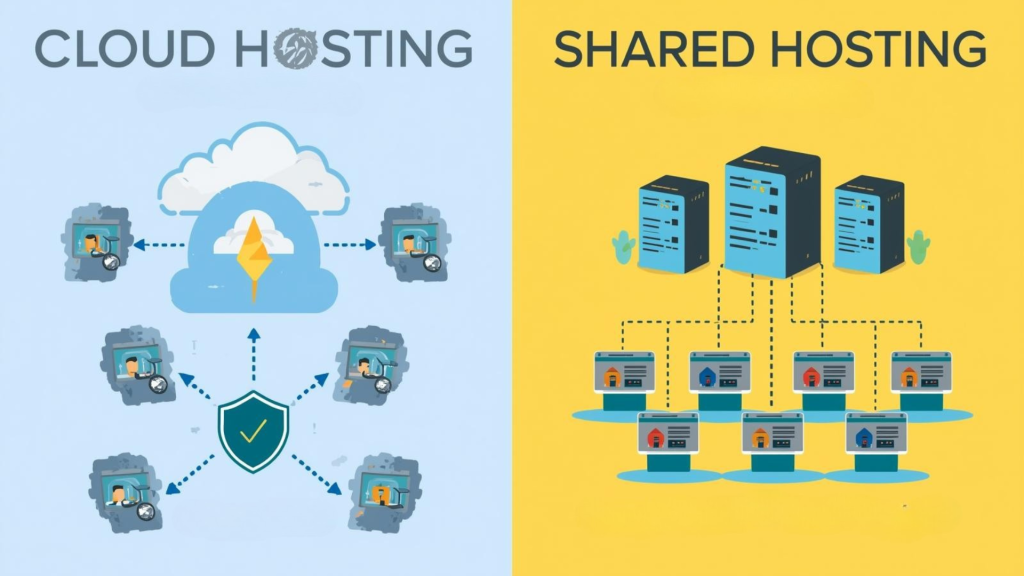
Cloud hosting is a hosting setup where your website runs on multiple connected servers instead of one single machine.
It’s like having a backup generator. When electricity goes off, the generator kicks up, ensuring you keep lighting your home. So is cloud hosting.
If one server has a problem, another one jumps in instantly.
And that way, your site stays online, your speed stays stable, and your visitors never notice anything.
It’s the same type of technology used by big platforms like Netflix and Amazon, but now simplified and made affordable by providers like Truehost.
If you want to explore, read this detailed guide on what cloud hosting is.
What Are the Advantages of Cloud Hosting Over Shared Hosting?
Cloud hosting delivers advantages that shared hosting simply can’t keep up with.
Here’s how it trips off over shared hosting:
| Cloud Hosting | Shared Hosting |
| Your website is spread across multiple servers, so a single failure doesn’t take you offline | Relies on one server, which, if it goes down, your site goes down too |
| Optimized servers and dynamic routing ensure consistent speed, even on mobile networks common in Tanzania | Performance depends on other websites sharing the same server, slowing your site during peak traffic |
| Includes DDoS protection, firewalls, isolated environments, multiple backups, and real-time monitoring as security measures to protect you and your users’ data | Limited security as all websites share the same environment, increasing vulnerability |
| Offers instant scalability since CPU, RAM, and bandwidth adjust automatically as traffic grows | Scaling often requires manual upgrades or a full migration to a new plan. |
| Supports growth effortlessly, meaning you can add pages, apps, online payments, or media without restrictions | Resource limits make growing websites slow and difficult to manage |
In summary, shared hosting works for simple sites, but if your website plans to grow, cloud hosting is the smarter choice for long-term reliability and performance.
What Are the Disadvantages of Cloud Hosting Over Shared Hosting?
Cloud hosting is powerful, but it’s not perfect.
Here’s how it compares to shared hosting in terms of potential drawbacks:
| Cloud Hosting | Shared Hosting |
| Higher cost because premium performance and resources come at a price | Cheaper with a fixed low price, ideal for tight budgets. |
| More technical with more settings and features that feel overwhelming for beginners. | Easy to manage with a simple setup and minimal configuration. |
| Usage-based billing can make charges increase during traffic spikes. | Predictable billing with fixed monthly or yearly cost |
The bottom line is that cloud hosting offers speed, reliability, and scalability, but it requires a slightly higher budget and some technical know-how.
And that makes shared hosting a simpler and cheaper choice.
What is shared hosting?
Shared hosting is exactly what it sounds like. Your website lives on a single server that you share with many other websites.
It’s like renting a single room in a busy hostel.
You share the same CPU, same RAM, same resources, and same security environment with other websites.
And because everything is shared, the cost is much lower.
It is also simple and easy to set up, hence it works perfectly for beginners or small websites with low traffic.
What Are the Advantages of Shared Hosting Over Cloud Hosting?
Even though cloud hosting has its perks, shared hosting still shines in certain areas, especially if you are an individual or a small business in Tanzania.
Let’s break down why:
| Shared Hosting | Cloud Hosting |
| Very affordable with low-cost entry, perfect for tight budgets. | Costs more due to premium performance and resources |
| Extremely easy to use with no technical skills required | Has more settings and features, which can feel overwhelming |
| Good for small or static sites with few pages, low traffic, or informational content | Designed for growing or resource-heavy websites |
| Predictable pricing with fixed monthly or yearly cost | May use usage-based billing, so costs can fluctuate during traffic spikes |
Therefore, while cloud hosting is more powerful and scalable, shared hosting remains the smarter choice if you’re just starting or need predictable costs.
What Are the Disadvantages of Shared Hosting Over Cloud Hosting?
Shared hosting is great for beginners and small sites, but it has limitations, especially compared to cloud hosting.
Here’s how it falls short:
| Shared Hosting | Cloud Hosting |
| Sharing resources with other sites slows your site unpredictably | Cloud hosting uses multiple servers, so traffic spikes don’t affect performance |
| Higher chance of downtime, where if the server fails, your website goes offline | Has redundancy, where if one server fails, another takes over instantly |
| Limited scalability in that growing your site often means migrating to a bigger plan | Scales resources automatically without migration |
| Security risks where hacks on one site can affect all others on the server | Isolates environments, reducing security risks significantly |
| Not ideal for business websites like eCommerce, apps, large blogs, or membership portals, as they may struggle | Handles high-traffic, resource-heavy, or transaction-based websites smoothly |
In short, shared hosting works for small, static, or personal websites.
However, if your website grows or handles sensitive data, cloud hosting offers the reliability, speed, and security that shared hosting simply can’t match.
What Is the Difference Between Cloud Hosting and Shared Hosting?
If you’ve been wondering exactly how cloud hosting stacks up against shared hosting, let’s cut through the noise and see the differences in plain, simple terms.
Think of it as a side-by-side reality check, so you can make the right choice for your website in Tanzania.
| Feature | Cloud Hosting | Shared Hosting |
| Server type | Multiple servers working together, so one failure won’t take you down | A single server shared with many sites, so one issue can bring your site offline |
| Performance | High and consistent, even during traffic spikes | Unpredictable. Slows down when other sites use resources |
| Uptime | Very reliable, near-zero downtime | Depends on the single server, so downtime is more likely |
| Scalability | Instantly scales CPU, RAM, and bandwidth as your traffic grows | Very limited, whereby upgrades usually require migration |
| Security | Strong protections, including firewalls, backups, and monitoring | Basic security, whereby a shared environment increases risk |
| Cost | Higher, but worth it for speed, reliability, and growth | Cheaper, ideal for beginners or small static sites |
| Best for | Growing businesses, eCommerce, apps, or high-traffic sites | Beginners, small blogs, or low-traffic personal sites |
The key takeaway is that cloud hosting grows with your website. It scales, secures, and performs no matter what happens.
On the other hand, shared hosting is fine when you’re starting, but sooner or later, you’ll hit the limits.
Cloud vs Shared Hosting: Which Hosting Is Best for You?
Here’s the truth:
There’s no one best option for everyone. There is only what matches your current stage and goals.
For instance, cloud hosting is best for performance, reliability, robust security and growth, while shared hosting is best if you just need something cheap and simple.
So the real question is…
What do you want your website to become?
A stable business tool? A fast-performing platform? An online store? A system that needs high uptime?
Or just a basic online presence with no real traffic yet?
Once you answer that, the choice becomes clear.
When Should I Use Shared Hosting?
Shared hosting is the better choice if:
- You’re building your first website.
- You’re launching a personal blog.
- Your site is small and informational.
- You don’t expect more than 200–500 visitors per day.
- You’re on a strict budget.
- You prefer a simple setup with no technical work.
In these cases, shared hosting saves money and works perfectly.
When Should I Use Cloud Hosting?
Choose cloud hosting if:
- You run an online store.
- You accept payments on your site.
- You’re building an application or portal.
- You expect your traffic to grow.
- Your users are sensitive to speed.
- You run ads or SEO campaigns.
- You want very high uptime.
- You want instant scaling.
Cloud hosting is also ideal for serious projects that can’t afford downtime, like booking systems, school platforms, or SACCOS websites.
Final Words
Choosing between cloud hosting and shared hosting should now be clear.
If you’re starting small and just need an affordable space online, shared hosting is enough.
But if you want speed, reliability, security, and room for growth, cloud hosting gives you all of that and more.
Ready to pick the perfect plan?
Explore Truehost cloud and shared hosting packages and get started with discounts that keep your hosting pocket-friendly.